If you work in digital marketing, content creation, or video production, you are probably familiar with the challenge of juggling multiple tools for a single project. One platform is used to download videos, another to convert file formats, and yet another to generate transcripts or subtitles. This fragmented workflow is not only inefficient but also disrupts productivity, making it harder to maintain focus and creative momentum.
Need Keep is an AI Video Downloader, Free Video Converter and Subtitle Tool developed by VidKitSoft, designed to simplify a wide range of multimedia tasks within a single application. Instead of relying on multiple tools, users can download, convert, and process media seamlessly from one Windows-based platform.
Combining high-speed downloading, GPU-accelerated video conversion, and AI-powered speech recognition, Need Keep delivers fast and efficient performance. Because all processing takes place directly on your computer, it eliminates many of the limitations associated with web-based services, including file size restrictions, reduced output quality, and potential privacy concerns.

Download Information
- Developer: VidKitSoft
- License: Free
- File Size: 177 MB
- Downloads: 1,284
- Rating: ★★★★☆ (4.7/5 Stars)
- Version: Latest
- Requirements: Windows 7/10/11
Core Features Breakdown
Rather than spreading itself too thin, Need Keep focuses on three pillar functionalities, optimizing each to fit natively into a professional production workflow.
1. Free Video Downloader
The downloading engine within NeedKeep is built to pull clean source files without arbitrary speed throttles. It natively parses links from major video and audio repositories, including YouTube, Facebook, SoundCloud, Bilibili, Twitch, and TikTok.
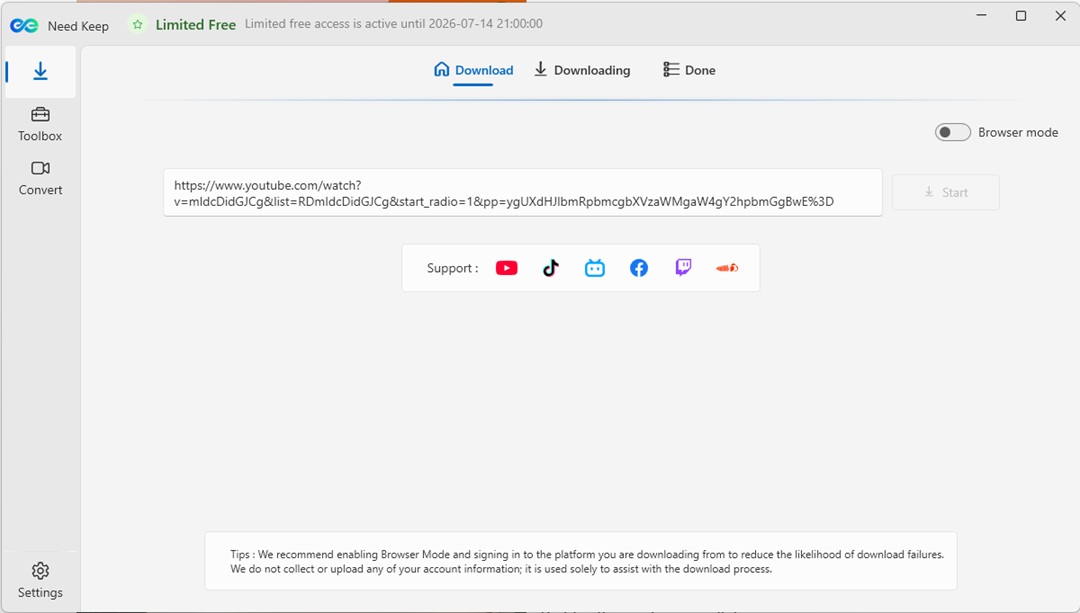
- Playlist & Batch Ingestion: Paste a playlist link to analyze, filter, and queue entire content batches simultaneously rather than copying individual links one by one.
- Lossless Audio Extraction: Pull original, uncompressed WAV audio streams or high-quality MP3s directly from video hosting sites—ideal for podcasters and sound designers.
- Ultra-HD Video Support: When the host platform supports it, Need Keep fetches raw 4K or 1080p video tracks alongside separate subtitle assets.
2. Free Video Converter | Robust Multimedia Conversion
File type mismatches are a recurring bottleneck when moving assets between non-linear editors like Premiere Pro, DaVinci Resolve, or Avid. Need Keep’s conversion pipeline is engineered to eliminate this friction through precise encoding controls.
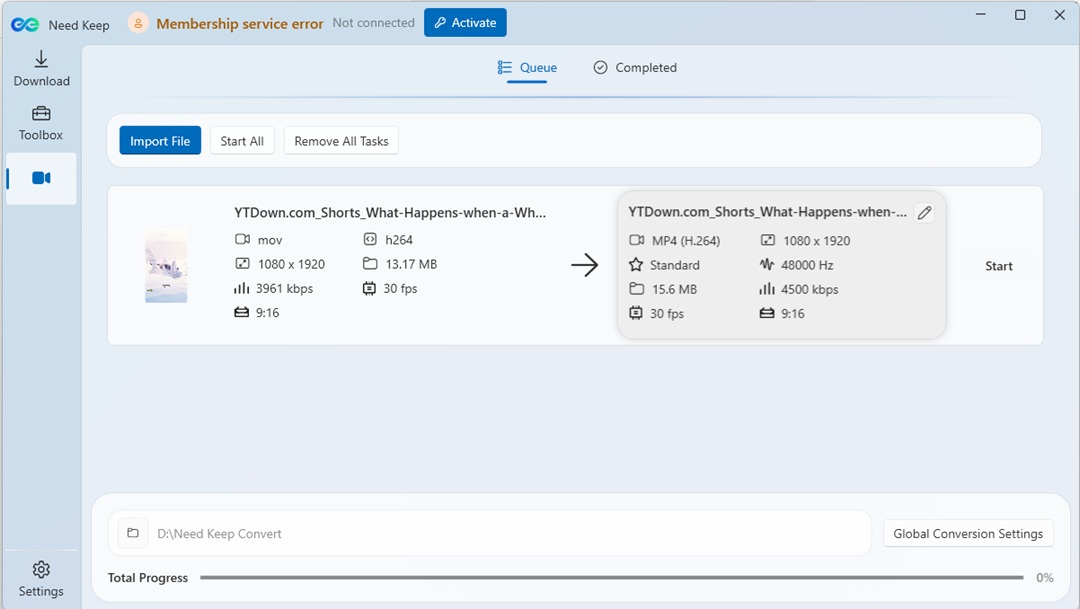
- H.265 + CRF Encoding: Compress heavy file sizes using modern codecs while leveraging Constant Rate Factor (CRF) adjustments to perfectly balance file size against visual fidelity.
- Fast MP4 Remuxing: Change containers instantly without re-encoding the underlying video streams, saving substantial processing time on tight deadlines.
- Target-Size Compression: Input an exact target file size (e.g., 25MB for email or messaging platform limits), and the application auto-calculates the necessary bitrates to meet that constraint.
- Clip Trimming: Use the built-in visual timeline to cut unnecessary footage or silence from the beginning or end of clips before initiating an export.
3. Need Keep Subtitle Extractor | AI-Driven Subtitle Extraction
The standout feature that elevates Need Keep above standard utility downloaders is its native speech-to-text subsystem. Utilizing advanced language models, the app listens to local or downloaded media files and instantly transcribes audio into perfectly timestamped text blocks.
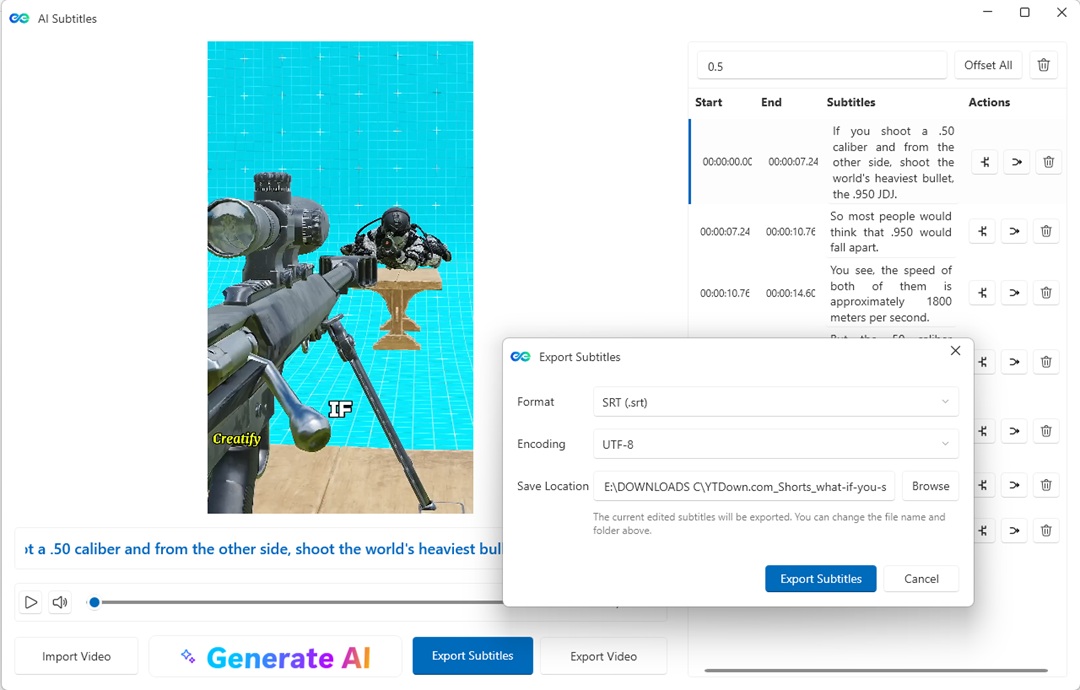
- Multilingual Timelines: Deep acoustic models easily accurately parse distinct global languages, automatically managing pacing and speaker pauses.
- Integrated Text & Sync Editor: Correct typos, adjust timing blocks, and refine line breaks directly on a dedicated, visual subtitle timeline before exporting.
- Flexible Deliverables: Export transcripts as standard standalone
.SRTsidecar files, pack them cleanly as soft subtitles within an MKV/MP4 container, or burn them permanently into the video matrix for mobile platforms like TikTok or Instagram Reels.
Analyzing the UX: Dual Optimization Workflows
Software utilities often fail when they clutter the user interface with unnecessary menus. Need Keep sidesteps this design trap by splitting its core operations into two distinct, highly readable operational workflows.
| Workflow Mode | Step 1 | Step 2 | Step 3 |
|---|---|---|---|
| Convert Mode | Import Media: Drag and drop single or batch video files into the UI workspace. | Configure Settings: Select container, codec, aspect ratio, and toggle AI subtitle options. | GPU Render: Execute local rendering utilizing hardware acceleration for quick processing. |
| Save Mode | Paste Link: Copy any authorized URL to let the tool inspect the remote source. | Select Formats: Check specific boxes for required video resolution, audio codecs, or closed captions. | Local Cache: Save the files directly to your storage directory for immediate editing access. |
Pros & Cons
The Bottom Line: Need Keep bridges the gap between raw file acquisition and editing-room readiness, eliminating the need to jump between multiple standalone software installations.
The Pros:
- Unified Local Pipeline: Drastically cuts down creative friction by combining scraping, transcoding, and transcription into a single desktop footprint.
- Hardware Acceleration Support: Leverages local GPU profiles to keep complex H.265 conversions and deep-learning AI subtitle processes fast without freezing your entire operating system.
- Clean Workspace: Operates entirely as a secure local app, meaning zero spam redirects, cookie trackers, or sketchy pop-up windows typical of online web tools.
- Native Global Localization: Fully supports 9 major languages right out of the box (including English, Japanese, Simplified/Traditional Chinese, Korean, Spanish, French, German, and Portuguese).
The Cons:
- Windows Native Only: The software is currently built for Windows 10 and 11 environments. Mac creators will have to wait for the macOS build that is currently in active development.
- Hardware Dependent Performance: Because transcription and video compression happen entirely on your machine, older or lower-spec PCs may encounter longer rendering times when processing heavy 4K files.
Final Verdict
For casual internet users who occasionally need to download a video clip once a month, free web tools might suffice. However, if you are a professional content creator, localization expert, video editor, or social media producer, Need Keep by VidKitSoft offers immense practical value.
By bringing downloading, advanced encoding, and precise AI subtitle tools into two intuitive local workflows, it solves one of production’s most irritating administrative problems: workflow fragmentation. It is clean, secure, remarkably fast, and highly recommended for any creator looking to reclaim valuable time during pre-production.
Video Tutorial: